
Is Your Laser Broken or Misunderstood? 5 Fixes to Save an Applications Call
Rough edges, heavy bottom dross, or melted corners on a 2D laser job usually have a faster fix than shop managers expect. Most cut-quality flaws that look like hardware failure, a degraded optic, a drifting cutting head, or a failing beam source trace back to application setup instead, including focus position, gas delivery, nozzle condition, or cutting path. Adjust the right parameter, and clean, high-quality laser cuts return without a technician visit or a lost production day.
Understanding how parameter adjustments directly impact laser cut edge quality can save your shop thousands of dollars in unnecessary technician calls and prevent days of downtime. This laser cut quality guide outlines five common cut-quality flaws, explains why they mimic hardware failures, and details how application tweaks can restore high-quality laser cuts without a service visit.
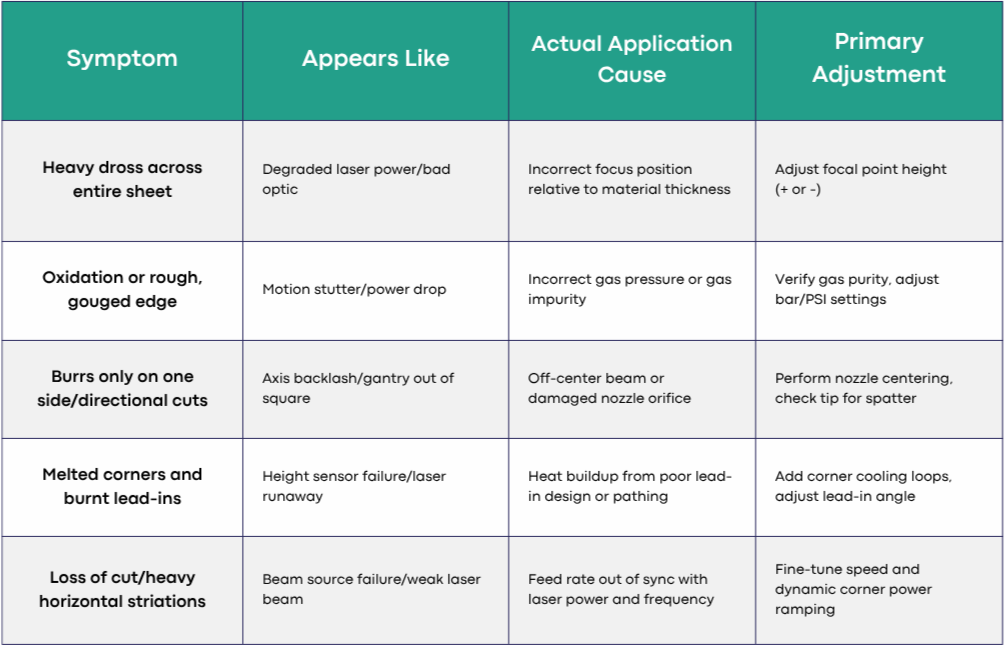
Quick Diagnostic Guide: Application Fix vs. Hardware Fault
1. Focus Position: The Shifted Focal Point
The Symptom
Your parts come off the table with persistent, heavy dross (burrs) clinging to the bottom edge, or a rough, hourglass-shaped cut face. In severe cases, the machine loses the cut entirely and skips across the material.
Why It Looks Like a Machine Fault
When a laser fails to slice cleanly through a sheet, operators often suspect a degraded beam source, dirty internal optics, or a failing power supply. Because the beam isn't penetrating properly, it can feel like the machine has lost energy density.
The Application Fix
The focus position dictates where the narrowest point of the laser beam (the waist) sits relative to the top surface, middle, or bottom of the material. Even a fraction-of-a-millimeter shift changes the power density delivered to the cut zone.
Mild Steel (Oxygen Cutting): Set the focus at or slightly above the top surface. This widens the kerf so oxygen can enter and drive the exothermic reaction.
Stainless Steel & Aluminum (Nitrogen Cutting): Set the focal point deeper, near the bottom surface or slightly below it, to concentrate energy at the root of the cut so high-pressure nitrogen can flush out molten material cleanly.
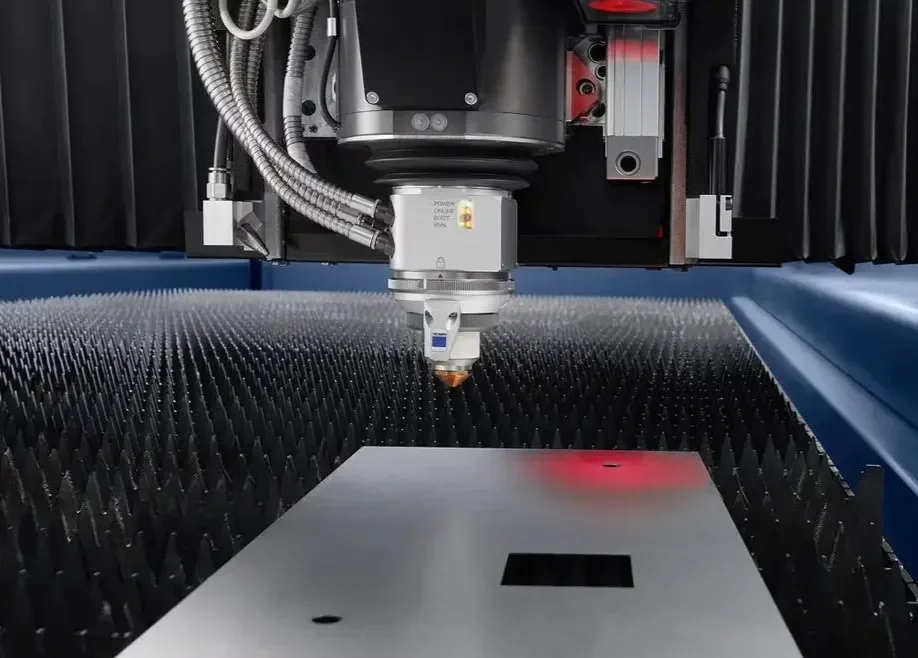
Many TRUMPF systems include DetectLine, which uses a camera to check sheet position and automatically verify focus position adjustment. On systems without that automation, run a manual focus test before making an applications call. Material batch variation, dirty protective glass, or an altered focal table after a software update are common culprits behind a compromised cut that has nothing to do with the beam source itself. Because TRUMPF's current 2D lineup runs on fiber beam sources rather than older CO2 resonators, focus accuracy matters even more. Fiber lasers concentrate power into a smaller spot, so small focus errors show up faster in the cut.
2. Assist Gas Type and Pressure: Flow Dynamics
The Symptom
Edges show discoloration, sticky oxidation scale, or gouging along the cut face. On nitrogen-cut stainless steel, the edge appears dark brown or yellow instead of bright silver.
Why It Looks Like a Machine Fault
Irregularities along the cut edge get misdiagnosed as motion vibration, gantry stutter, or fluctuating laser power.
The Application Fix
Assist gas does more than blow away melt. It’s an active part of the cutting mechanics:
Gas pressure: Nitrogen pressure set too low leaves molten metal inside the kerf to solidify as dross. Pressure set too high creates turbulence that disrupts smooth metal evacuation, causing horizontal striations.
Gas purity: Oxygen contamination in a nitrogen line causes discoloration and edge oxidation well before it shows up as a leak elsewhere. If stainless parts fail a paint adhesion test, the issue is almost always gas delivery, tank purity, or a line leak.
Gas flow volume: Pressure regulators and supply lines need to deliver consistent volume through a long cutting run. A pressure drop mid-sheet creates flaws that look like an intermittent power problem.
TRUMPF's AdjustLine function automatically adjusts cutting parameters to match material condition on systems that have it, and BrightLine fiber is TRUMPF's edge-quality technology for holding a consistent kerf across sheet thicknesses. Both are worth checking before assuming a gas or hardware problem.
3. Nozzle Condition & Centering: The Unsung Hero
The Symptom
Edge quality looks great cutting along the X-axis, then degrades into burrs, gouges, or blowouts as soon as the machine turns onto the Y-axis or a circular contour.
Why It Looks Like a Machine Fault
Directional cut errors strongly mimic mechanical drive issues, such as axis backlash, worn rack-and-pinions, loose drive belts, or an out-of-square gantry.
The Application Fix
If a laser cuts well in one direction but poorly in another, the problem is almost always nozzle centering.
The laser beam must pass precisely through the nozzle orifice's geometric center. If the beam is slightly off-center:
The assist gas stream will flow unevenly around the laser beam.
Gas pressure will push molten metal efficiently in one direction but push it against the cut wall in the opposite direction.
How to correct it:
Perform a Nozzle Centering Check: Use target tape to execute a low-power beam pulse. Adjust the manual centering screws on the cutting head until the beam impression is perfectly centered within the nozzle orifice.
Inspect for Nozzle Damage: Tiny slag spatter stuck inside the orifice or a microscopic nick on the tip will disrupt laminar gas flow dynamics, creating turbulence. Replace or clean damaged nozzles immediately.
Match Nozzle Size to Material: A nozzle diameter that is too small restricts gas volume; one that is too large wastes gas and causes pressure drop.
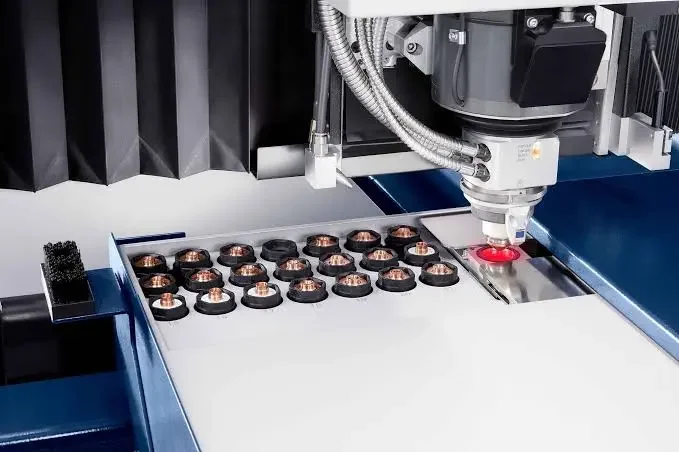
TRUMPF's SmartNozzle automation, on systems equipped with it, inserts the correct nozzle and automatically checks both condition and beam centering. Confirm with your applications engineer whether your specific machine has this option before troubleshooting it as a manual-only process.
4. Nesting Strategy & Lead-in Design: Managing Heat Buildup
The Symptom
Parts show melted corners, burned-out small contours, or severe blowouts right where the laser pierces and begins the cut. Parts sometimes weld themselves back into the skeleton frame too.
Why It Looks Like a Machine Fault
Thermal damage looks like an uncontrolled height sensor or a laser source stuck at full power.
The Application Fix
Laser cutting introduces massive amounts of thermal energy into the material fast. Without smart nesting and pathing logic, localized heat accumulation ruins cut precision.
Optimize Lead-In Geometry: Placing lead-ins directly on sharp corners concentrates extreme heat at a delicate geometric point. Move lead-ins to flat edges and use hairpin or curved (radiused) lead-in paths instead of straight perpendicular entries.
Path Planning: When cutting dense nests on modern 2D laser cutting automation systems, avoid cutting small adjacent contours back-to-back. Scatter the cutting order across the sheet so localized areas have time to cool.
Corner Loops & Cooling Pauses: Implement corner loops (which swing the beam outside the part boundary to change direction) or brief cooling pauses at sharp points to prevent localized melting.
TRUMPF's CoolLine keeps the workpiece at a controlled, cool temperature during cutting on narrow contours and delicate geometry, which addresses this exact problem at the machine level rather than through nesting software alone. If heat buildup is a recurring issue on small or intricate parts, ask whether CoolLine is available on your system before reworking the entire nest.
5. Feed Rate vs. Laser Power Balance: Over-Burning vs. Loss of Cut
The Symptom
The cut face exhibits deep, coarse striations, excessive kerf width, or parts drop out of tolerance due to thermal expansion. Conversely, speeding up slightly causes a complete loss of penetration.
Why It Looks Like a Machine Fault
Improper speed settings often cause loss of penetration and are frequently misdiagnosed as beam source degradation or optical lens contamination.
The Application Fix
High-quality laser cuts depend on a precise balance between feed rate, laser power, and pulse frequency.
Over-burning (too slow): Excess energy melts too much material. The kerf widens, and molten turbulence leaves deep striations.
Loss of cut (too fast): Travel speed outruns the energy delivery rate. The beam can't melt through cleanly, resulting in dross or ejected metal.
Modern CNC controls adjust laser power automatically as the gantry decelerates into corners and accelerates back into straightaways. TRUMPF's Active Speed Control monitors the kerf through the nozzle and regulates feed speed in real time to compensate for thickness variation or surface contamination, on systems that carry it. If corners are burning consistently, check whether your technology tables have dynamic power and frequency ramping enabled for that material thickness before assuming a hardware issue.
Know When to Call Applications vs. Service
Before scheduling an applications call that ends in a technician simply adjusting your technology tables, run through this checklist:
Check your consumables: Is the nozzle clean, centered, and undamaged? Is the protective glass clean?
Verify your assist gas: Are pressure and gas purity levels correct at the back of the machine?
Audit your focus position: Has the focal point been verified for this specific batch of material?
Review nesting logic: Are lead-ins and thermal pathing optimized for part geometry?
If those variables check out and quality issues persist, the cause may be programming logic, operator training, or an unoptimized technology table rather than a broken machine component. That's when our applications engineers step in.
Maximize Your Productivity with Maintecx
Instead of losing valuable time to unnecessary service appointments, consult our expert team. Our applications engineers spend every day fine-tuning TRUMPF parameter tables and cutting routines, and training the shop operators who run them. Loop us in before scheduling an applications call, and we can usually tell within a short conversation whether a cut-quality issue is an application fix or a genuine hardware problem.
Get expert TRUMPF support from our applications engineers and put your laser back to producing high-quality cuts.
